
Description
One store online. All your shopfronts.
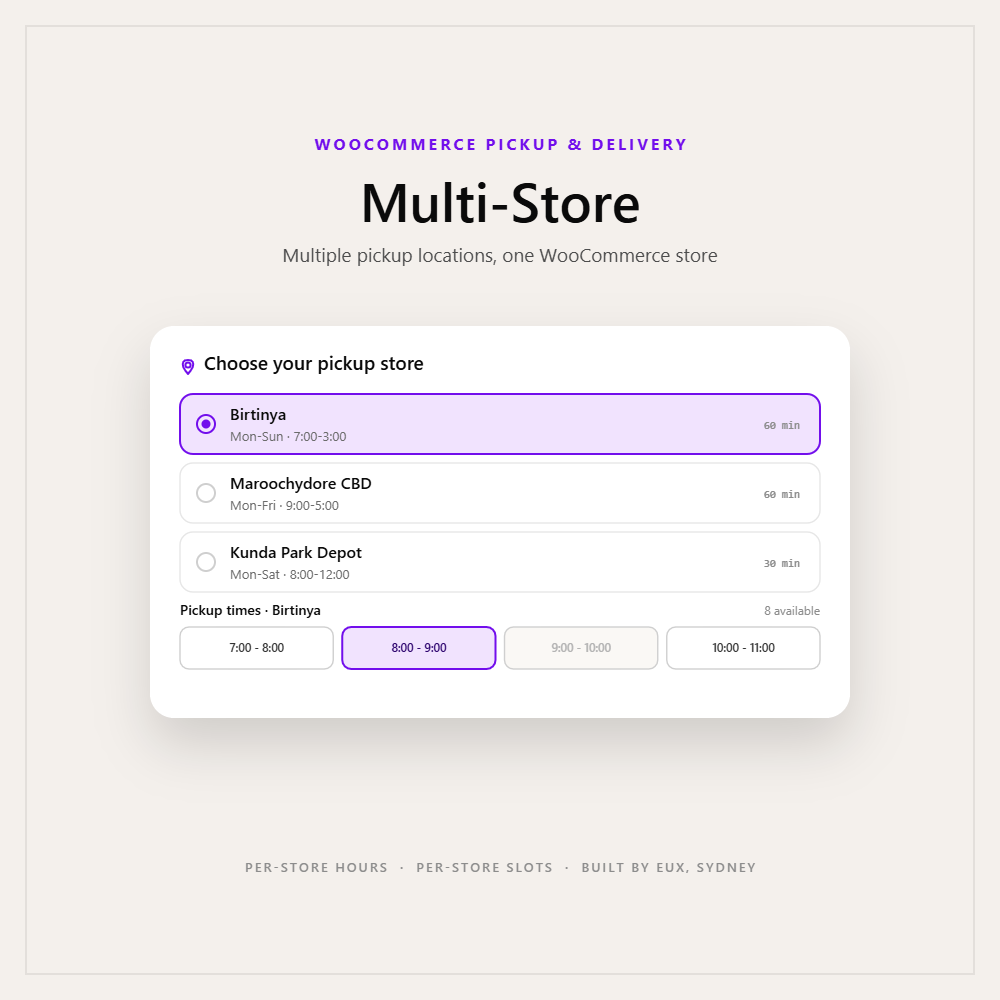
Most click-and-collect plugins assume a single pickup point - one address, one set of hours. Multi-Store lets customers choose which location to collect from, and each store's own opening hours drive its own time slots. Run every shopfront from the one WooCommerce store.
Not a list of addresses. A scheduler per location.
Each store is its own record - address, phone, opening hours, slot interval and map - and the customer's available times recalculate for whichever store they pick.
Per-store hours drive per-store time slots.
A shop open 7-3 and a shop open 9-5 present different pickup times, automatically. Choose a store and the date and slot availability recalculates for that store's schedule - wired through the base plugin's own slot engine, so it stays consistent with single-store scheduling.
A map for every location
Each store renders its own map from its address - and unit or suite addresses like "1/299" are handled so the map points to the right place, not a building level.
Turn a location on or off
Each store has an enable toggle and a display order. Take a shopfront offline for renovations without deleting it, and control exactly how stores are listed to customers.
Pick a store, pick a time, check out.
Multi-Store slots into the Pickup & Delivery step customers already use - it just adds the "which store" choice up front.
Your locations, in one panel.
Stores live under Pickup & Delivery → Pickup Settings - no new menu to learn. Toggle a shopfront on or off, and set the order customers see. Try it:
The location half of the toolkit.
Multi-Store and Pro both extend the same free base, and neither needs the other. Run base only, base + Multi-Store, base + Pro, or all three.
Pickup & Delivery
The base flow: a pickup-or-delivery step before checkout, date picker, time slots, delivery suburbs, and order meta. Required for the add-ons.
Multi-Store
Multiple pickup locations, each with its own address, hours, interval and map. Customers choose where to collect; slots recalculate per store.
Pro
The rules and capacity half: daily caps, lead time, same-day cutoff, and targeting by suburb, postcode, state or product.
Running both? Pro's rules operate alongside multi-store pickup - the base rule engine carries a store condition, so a rule like "Birtinya caps at 30 pickups a day" is Pro's capacity cap scoped to one location.
Safe to switch on. Safe to switch off.
Your current store becomes "Main store"
Multi-Store seeds your first location automatically from your existing single-store pickup settings - your current address, phone, hours and interval carry over with zero manual re-entry. Add your other shopfronts from there.
Your pickup address is handed back
Switch the add-on off and it copies your first usable store's details back into the base plugin's pickup settings, so the base keeps a valid pickup address and your storefront keeps working. Nothing breaks.
Serious engineering under a simple selector.
No phone-home
No licence server, no external services, no outbound calls. Everything runs inside your own WordPress install. The only external resource is a store's map embed, loaded in the visitor's browser.
Security hygiene
Admin-gated REST endpoints, every stored field sanitised, map output passed through a strict allowlist, and validated input bounds throughout.
HPOS-safe
It rides on the base plugin's order handling, which is fully compatible with WooCommerce High-Performance Order Storage.
Stable store identity
Each store carries a UUID, so renaming a location or reordering the list never breaks the link to orders already placed against it.
Questions, answered.
Does this work on its own?
No - it is an add-on. Install and activate the free EUX Pickup & Delivery base plugin first, then activate Multi-Store alongside it. A clear admin notice appears if it is active without the base.
Do I need the Pro add-on too?
No. Multi-Store works with just the base plugin. Pro is a separate add-on - you can run either, both, or neither.
Can each store have different opening hours?
Yes - that is the core feature. Each store has its own hours and time-slot interval, and the customer's available pickup slots recalculate for the store they choose.
What happens to my current pickup address when I install it?
It is preserved. On activation the add-on creates your first store ("Main store") from your existing pickup settings automatically - no re-entry.
What happens if I deactivate it later?
It copies your first usable store's details back into the base plugin's pickup settings, so your storefront keeps a valid pickup address. Nothing breaks.
Can I temporarily turn a location off?
Yes. Each store has an enable/disable toggle, so you can take a location offline without deleting its configuration.
Does each store get its own map?
Yes, built from that store's address. Unit and suite addresses are handled so maps point to the right place.
Does this add delivery locations too?
No - it adds multiple pickup locations. Delivery configuration (suburbs, states, postcodes) stays as handled by the base and Pro plugins.
Does it send data to any external service or need an activation key?
No. It makes no outbound calls and runs entirely on your site. The only external resource is each store's map embed, which loads in the visitor's browser.
Is it compatible with HPOS?
Yes, through the base plugin's HPOS-compatible order handling.
Let customers choose where to collect.
Start with the free plugin, then add Multi-Store the moment you open a second location. Need a hand setting up your stores? EUX can do that with you.
















There are no reviews yet.