
Description
Your Bondi team shouldn't see Parramatta's orders.
In WooCommerce, everyone with order access sees every order. Store Allocation makes ownership a rule: route orders to the right staff by method, state, suburb or pickup store - and each person's Orders screen only ever shows the orders that are theirs. Less noise, fewer mistakes, and customer data scoped to who needs it.
Real access control, not a hidden row.
Allocate orders to staff with simple rules, then WooCommerce enforces it - at the database query level, so out-of-scope orders never reach a restricted user at all.
Allocate orders to staff by rule.
Each rule assigns one or more users to the orders that match its conditions. Conditions combine with AND logic, and any you leave empty is ignored - so a rule can be as broad as "all deliveries" or as tight as "pickups at the Bondi store".
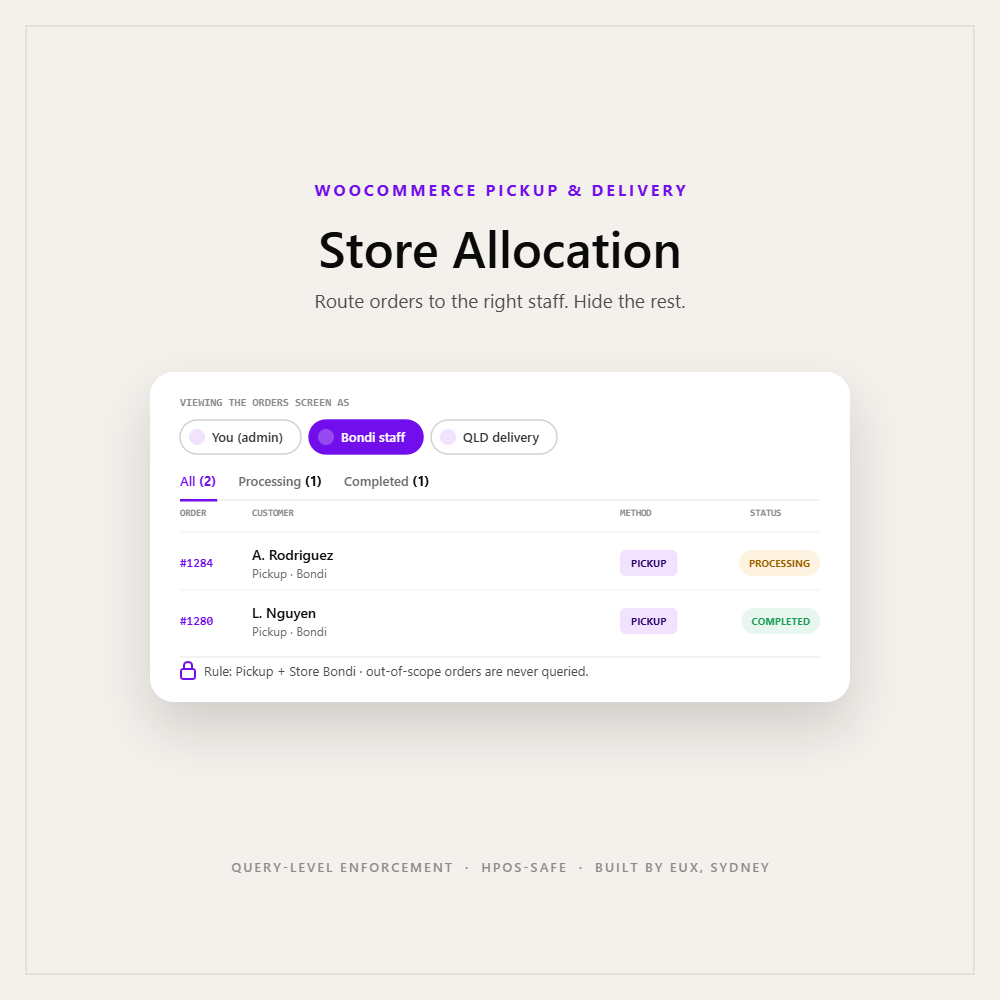
The Orders list, locked down
Allocated staff only ever see orders that match their rules - enforced at the query level, so nothing leaks through search, filters or pagination.
Counts that match reality
Status tab counts and the sidebar processing badge recalculate to the user's own orders - never misleading store-wide totals.
Set the conditions. Watch who it covers.
Pick a method and a condition - the matching orders update live. This is exactly how a rule scopes a staff member's view.
Orders this rule covers
2 of 8If you can describe it, you can scope it.
The staff-and-access half of the toolkit.
Every add-on extends the same free base, and each is independent. Run any combination - they compose.
Pickup & Delivery
The base flow before checkout. Required for every add-on.
Pro
Capacity caps, lead time and cutoff - what customers can book.
Multi-Store
Multiple pickup locations - and the store list this add-on allocates by.
Store Allocation
Routes each order to its staff and hides the rest. The access layer.
Best paired with Multi-Store - that's where the pickup-store condition gets its list. Independent of Pro: Pro governs what customers can book, Store Allocation governs which staff see and manage the orders that result.
Enforcement, not cosmetics.
Enforced at the query level
Restriction is applied through an allow-list of permitted order IDs on the order queries, so disallowed orders are never returned - real access control, not a row hidden with CSS.
Accurate counts, not just lists
Status tab counts and the sidebar processing badge are recomputed against each user's allocation, so a restricted user is never shown misleading store-wide totals.
HPOS & legacy compatible
It filters both classic post queries and WooCommerce HPOS order list-table queries, and corrects the HPOS status-tab counts that WooCommerce aggregates separately.
Fail-safe defaults
Only users named in an enabled rule are restricted. Administrators and unallocated users see everything as normal, so the add-on can never lock out your admins.
No phone-home
No licence server, no external services, no outbound calls. Everything runs inside your own WordPress install, with admin-gated, nonce-protected endpoints.
Method-aware matching
Pickup rules ignore state and suburb; delivery rules ignore the store. Conditions behave intuitively, and older saved rule formats are migrated automatically.
Questions, answered.
Does this work on its own?
No - it is an add-on. Install and activate the free EUX Pickup & Delivery base plugin first, then activate Store Allocation alongside it. A clear admin notice appears if it is active without the base.
Do I need the Multi-Store add-on?
Only if you want to allocate by pickup store. Allocation by method, delivery state and suburb works with just the base plugin - the pickup-store condition uses Multi-Store's store list.
Will this restrict my admin account?
No. Only users explicitly named in an enabled allocation rule are restricted. Administrators and any unallocated user see all orders as normal.
Is it real access control or just hiding rows?
Real access control. A restricted user's order queries are limited to an allow-list of permitted order IDs at the database level, so out-of-scope orders are never returned - not hidden after the fact.
Do the order counts update too?
Yes. Status tab counts and the sidebar processing badge are recalculated to match each restricted user's allocation.
Does it work with HPOS?
Yes - both legacy and HPOS order storage are filtered, including the HPOS status-tab counts.
Can one rule combine conditions?
Yes. All non-empty conditions on a rule must match (AND logic). Leave a condition empty to ignore it, making rules as broad or as narrow as you need.
Can several staff share the same orders?
Yes. A rule can list multiple users, and a user can appear in multiple rules - their visible orders are the union of every rule they belong to.
Does it send data anywhere or need an activation key?
No. It makes no outbound calls and runs entirely on your site.
Does it change what customers see?
No. Store Allocation only affects the wp-admin Orders experience for staff. Customer-facing checkout behaviour is handled by the base, Pro and Multi-Store.
Give every team just their own orders.
Start with the free plugin, then add Store Allocation to route each location and team to exactly what they handle. Need a hand setting up your rules? EUX can do that with you.















There are no reviews yet.