
WordPress Plugin · v1.0.3

The Atria Connector - your shop floor and your website, in sync.

A two-way bridge between a store's in-store Atria POS and its WooCommerce website. Products flow out to the web, online orders and customers flow back to the counter, fulfilment status syncs automatically, and a full loyalty program ties in-store and online shopping together with one barcode.

Connects Wedderburn × WooCommerce · built by eux.
No double entryone system of record
One barcodein-store & online
Wedderburn Atria
Atria POS
in-store
WooCommerce
WooCommerce
your website
Products, prices & imagesto web
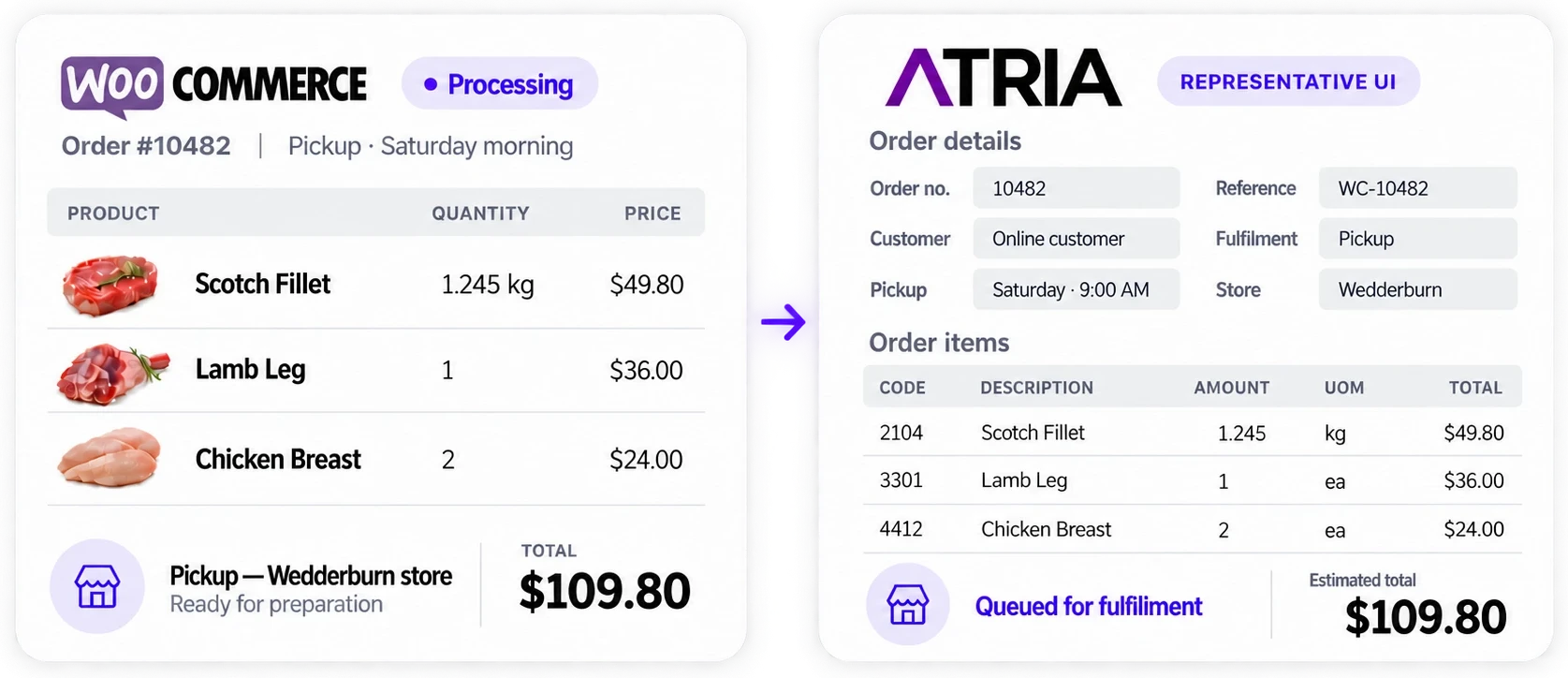
Orders & customersto POS
Order marked “Filled”auto-complete
Loyalty pointsboth ways
High-level data flow

One connector. Two systems. Data moving both ways.

The plugin lives inside WordPress and brokers every exchange between Atria and WooCommerce - so staff work in one system and customers shop in another, without anyone re-keying data.

Atria ↔ WooCommerce

Two-way sync
Atria POS / ERPin-store · source of truth
e-Commerce itemsIsEcommerce
Order status “Filled”fulfilment
In-store loyaltyearn / redeem
Customer recordscreate / update
Connector
WooCommerceyour website · customers
Shop & product pagespublished
Online ordersat checkout
Points & redemptionMy Account
Accounts & barcodes983000…
Products to web
Catalogue, prices & images sync out of Atria.
Orders to POS
Every checkout pushes customer & order to Atria.
Fulfilment back
“Filled” in Atria completes the web order.
Loyalty both ways
Points earned in-store & online, one ledger.
Atria → WooCommerce · products, fulfilment, in-store points WooCommerce → Atria · orders, customers, points redeemed
AUTHENTICATED WITH x-api-client x-api-key · ODATA QUERY SYNTAX
What it does

Four jobs, one plugin.

01

Product Sync

The in-store catalogue - prices, descriptions, stock, images and weights - becomes the online shop automatically.

View details
02

Order & Customer Sync

Every online order and customer is pushed into Atria. Mark it “Filled” in-store and the website order completes itself.

View details
03

Loyalty Program

1 point per $1 - online or in-store. One barcode by email & SMS, a live balance and ledger, and redemption at checkout.

View details
04

Admin Control Centre

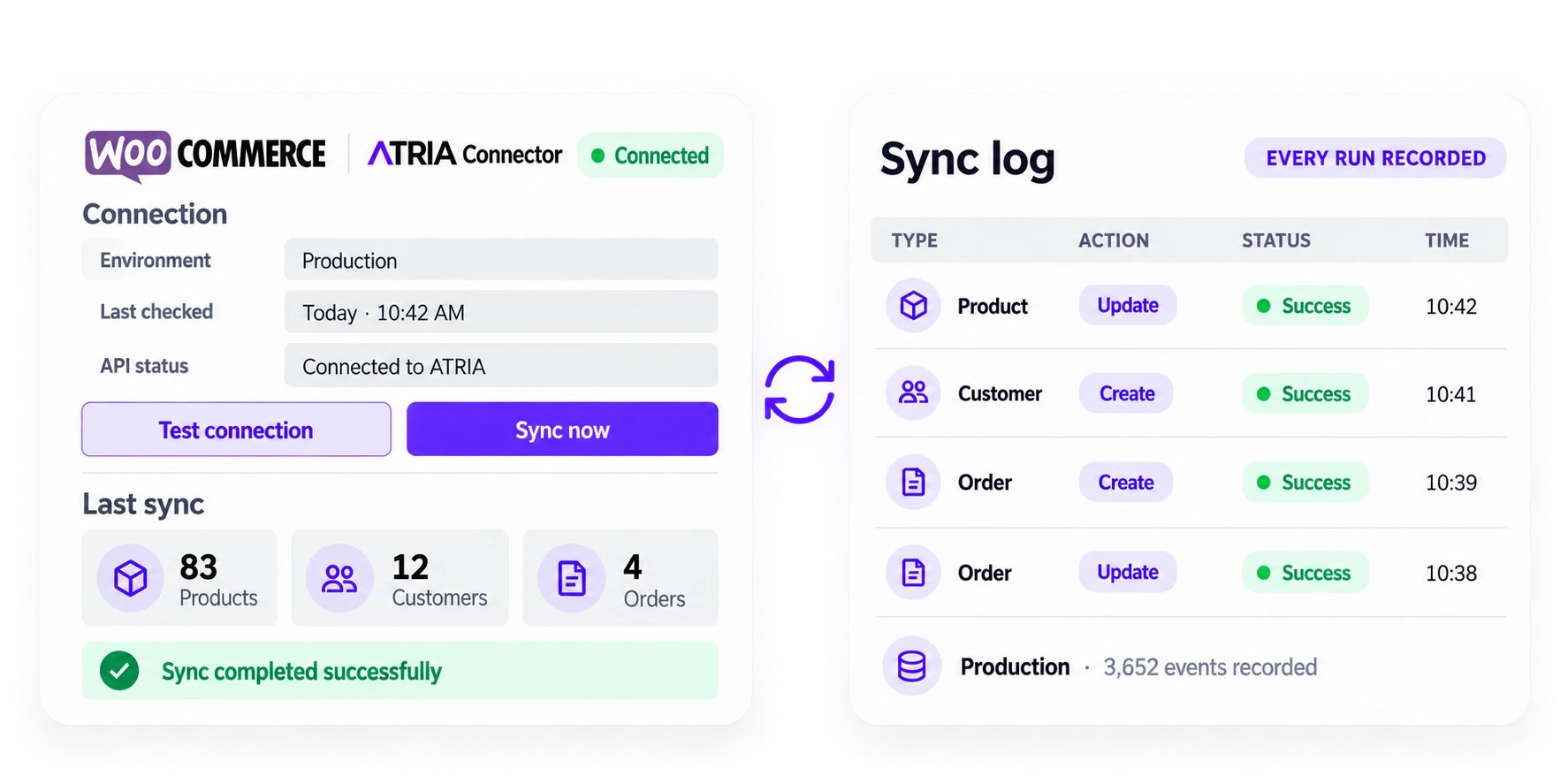
Sandbox/production credentials, a Test Connection button, one-click bulk import with live progress, and a searchable sync log.

View details
The store side · Wedderburn Atria Manager

Where your team sets it up: the E-commerce tab.

Everything online starts in Atria Manager. Product Editing has an E-commerce tab - tick “Send to E-commerce”, choose how the item should appear, and it syncs to the website. These are real screens from the Atria Manager guide.

Atria Manager E-commerce tab - product editing
Atria Manager · Product Editing → E-commerce tabWedderburn
1
Send to E-commerce - tick to sync the item. Unticking stops syncing but won’t remove it; set Status → Archived to take it off the store.
2
Status - Active, Active/No Stock, Archived or Draft (see below).
3
Group - initialised from the Atria product group; appears online as the Product Type.
4
Description - the product name. For weighed items the unit weight is appended automatically.
5
Format - quick formatting of the description for the online store.
6
Unit weight - for weighed items, the nominal weight each unit is sold in online (e.g. 250 g, 100 g, 2 kg).
7
Unit of Measure - g or kg; appends to the description and price.
8
Unit price - the online price. Initialised from the Atria unit price × unit weight, but editable.
9
RRP - set higher than the Unit price to show the item on Sale online.
10
Primary image - the main product photo. More images can be added in the EUX UI.
11
Online product description - an extended, store-only description. Supports HTML bold, italic & underline; not sent to scales or POS.

Status - control availability without deleting

The Status field decides how (or whether) the product shows online. Change the status in Atria rather than unticking “Send to E-commerce”.

Active

Ready to sell online and available to customers.

Active / No Stock

Shows online but marked “Sold out / Out of stock”.

Archived

No longer sold - removed from the store and unavailable.

Draft

Not ready to sell - hidden and unavailable to customers.

2.0

Setup requirements

Wedderburn sideNeeds
Atria ManagerVersion 9.6 or higher
WSAIMSHOPAtria E-Commerce AIM integration module licence
WSMYACCESSAtria Manager My Access
WSMYSHOPIFYE-Commerce monthly link
.NET Desktop Runtime8.0.23 x64
EUX sideNeeds
EUX e-commerce websiteThe WooCommerce store running the Atria Connector
EUX subscriptionActive subscription
Pillar 01 · Product sync

From an Atria item to a finished shop page.

Only items flagged IsEcommerce eq true are pulled in. Each field maps to its place on the WooCommerce product - hover or tap a field on the left to see where it lands.

Whatever you sell in store shows up on your website on its own. The name, price and photo are pulled straight from your Atria POS and kept up to date - so you manage everything in one place, and the website just follows along. Here's the live result:

Atria item · PLU 206POS record (JSON)
source
PLUCode206
EcommerceDescription‘KAIZEN’ MINCE (LIVER/HEART/TESTICLE) 500g
EcommerceRrpPrice10.99
EcommerceUnitPrice- (no sale)
EcommerceGroupBEEF
IsWeighedfalse → _uom = ea
ItemLabelImages · box 7atria-sync-plu206-7.jpg
IsEcommercetrue ✓
boococks.com.au/shop/beef/kaizen-mince…
Free Delivery for all orders over $100
Home / Shop / BEEF / ‘KAIZEN’ MINCE…

‘KAIZEN’ MINCE (LIVER/HEART/TESTICLE) 500g

$10.99ea
Add to wishlist
SKU: 206
Category: BEEF  ·  Tag: BEEF
Share:
There are no reviews yet. Be the first to review “‘KAIZEN’ MINCE (LIVER/HEART/TESTICLE) 500g”.

FAITHFUL RECREATION OF THE LIVE PAGE · boococks.com.au/shop/beef/kaizen-mince-liver-heart-testicle-500g · SKU 206 · $10.99 ea · in stock

Title, price, primary image and category come straight from Atria. Where products carry them, ingredients, storage and country of origin flow into dedicated fields too - rendered on the page by the [ingredients], [storage] and [country_of_origin] shortcodes. Edit a product in Atria Manager and the change syncs straight through - no editing on the website itself.
5.3

Product-type decision tree

How the connector decides whether to build a simple, variable or variation product.

Has ParentPLUCode

→ Variation

The item becomes a product variation under its parent, matched by SKU. A weight term like 500 g is created and linked to the parent, then the parent is re-synced.

No parent · has children

→ Variable product

A query for items?$filter=ParentPLUCode eq {sku} finds children, so a variable parent is built with a global pa_weight attribute.

No parent · no children

→ Simple product Kaizen

A straightforward simple product with one price and unit. Kaizen (PLU 206) is this kind - $10.99 ea. Stock management stays off; everything saves as “in stock”.

5.4

How each product type looks to shoppers

Two of the three become shopping pages. A simple product has one fixed price; a variable product lets the customer choose a weight, and the price updates to match. Try the weight selector on the right.

Simple product SKU 206
Kaizen mince
‘KAIZEN’ MINCE (LIVER/HEART/TESTICLE) 500g
$10.99 ea
One price · no options
From an Atria item with no ParentPLUCode and no children - sold as a fixed pack.
Sold as a fixed pack at one set price - the simplest kind of product.
Variable product SKU 188 · 188-05
Cape Grim T-Bone
Cape Grim Grass-Fed T-Bone Steak
$18.50 · $37.00/kg
A parent with pa_weight variations - each weight is its own child item in Atria (ParentPLUCode 188), priced at $37.00/kg.
One product, several weights to choose from - the price follows the weight automatically.
5.1

Complete product field map

Every Atria item field and where it lands on the WooCommerce product. Mandatory fields are flagged - an item with no PLUCode is skipped entirely.

Atria fieldWooCommerce destinationNotes
PLUCodeSKUMandatory. Product creation is skipped without it.
ParentPLUCodeProduct typeIf present, the item becomes a variation of that parent (matched by SKU).
EcommerceDescriptionProduct nameFalls back to ItemTexts type 1031 if empty.
EcommerceRrpPrice_regular_priceThe RRP.
EcommerceUnitPrice_sale_price & _priceWhen present, becomes the displayed (active) price. Kaizen has none, so only the regular price shows.
EcommerceGroupProduct category & tagCategory is created if it does not exist. Kaizen → BEEF.
Inventories[].OnHandStock qty (calculated)Summed, but stock management is off - all products save as “in stock”.
IsWeighed_uomtrue → kg, false → ea (each). Kaizen is ea.
EcommerceUnitWeight + Uom_unit_weight_in_kgIf Uom === 6 already kg, else grams ÷ 1000. Defaults to 1 for non-weighed items.
ParentConversions[0]Variation pa_weight termSubUom 6 = kg else grams. Builds option strings like “500 g” / “1.2 kg”.
ItemLabelImages[] · ImageBoxNo 7Featured imageDownloaded & sideloaded with the filename prefix atria-sync- (e.g. atria-sync-plu206-7.jpg).
5.2

ItemTexts & the content shortcodes

Atria items carry an ItemTexts array of typed content blocks. These map to product meta, surfaced on the page by three shortcodes.

Type codeMaps to
1031Product name (fallback)
8_country_of_origin
1033_ingredients
1034_storage
10Long & short description
otherAppended to long description
ShortcodeRenders
[country_of_origin]_country_of_origin
[ingredients]_ingredients
[storage]_storage
Each shortcode supports a view="list" attribute (currently the only view), letting a page builder drop “Country of Origin / Ingredients / Storage” blocks onto the product template with data straight from the POS. The Kaizen page leaves these empty, so only the Reviews and Shipping & Delivery tabs render.
Variants & weighed items

One product, a few options - built from a parent & its children.

A drop-down like 2 kg / 4 kg online is three items in Atria: a parent and a child per option. Variant items must be set up as inventory Stock items.

Atria items · PLU 100 + childrenparent + two children
source
Parent · EcommerceDescriptionPORK HAND CORNED BONELESS
Parent · PLUCode100
EcommerceGroupPORK
Child 101 · ParentQuantity2 → “2 kg”
Child 102 · ParentQuantity4 → “4 kg”
Child · EcommerceRrpPrice25.98 / 51.96
Connector buildspa_weight variable ✓
boococks.com.au/shop/pork/pork-hand-corned…
Free Delivery for all orders over $100
Home / Shop / PORK / PORK HAND CORNED BONELESS

PORK HAND CORNED BONELESS

$25.98 / pack · $12.99/kg
SKU: 100 · variation 101
Category: PORK  ·  Tag: PORK
There are no reviews yet. Be the first to review “PORK HAND CORNED BONELESS”.

INTERACTIVE · hover an Atria field on the left to see where it lands · change the weight to watch the price & SKU update

INTERACTIVE · change the weight to watch the price update - one product, a few options

Atria Manager Inventory tab - child item linked to parent 100, parent quantity 2
Atria Manager · the child item’s Inventory tabWedderburn
PARENT · PLU 100

Create the parent item

e.g. PORK HAND CORNED BONELESS. On the Inventory tab set Inventory type = Stock and the unit of measure (kg or each), then Save.

CHILD · PLU 101 / 102

Create a child per option

e.g. …2 kg and …4 kg, each as a Stock item with the right unit of measure.

LINK

Point each child at the parent

On each child’s Inventory tab set Parent product = 100 and Parent quantity = its weight (2, then 4). Save - the online drop-down builds itself.

Weighed vs non-weighed items

Weighed items are sold by the kilo in store but as fixed “each” units online, using the nominal unit weight to auto-calculate the price (which you can override). Non-weighed items are sold as each in both places - unit weight doesn’t apply and is disabled in Atria.

Devon Sliced 500g at $8.00 online
Weighed · $15.99/kg in store → $8.00 per 500 g online
Beef Sausages thin 3kg at $32.00 online
Weighed · $10/kg → $32 per 3 kg (overridden from $30)
San Remo Penne 500g at $3.45 online
Non-weighed · sold as each, in store and online
Pillar 02 · Order & customer sync

One order, from “Place order” to packed and paid.

Staff never re-type a web order. It lands in Atria with the rest of the day's sales - and when it's packed and marked “Filled”, the website finishes the job. Tap a step.

Step 1 · WooCommerce

The customer checks out online

On the order-confirmation page, the woocommerce_thankyou hook fires. The connector reads the cart, the customer's details and any pickup/delivery slot, ready to push everything to Atria.

Order #10432 · A$72.40
6 items · Birtinya pickup
Paid online
# checkout complete POST customers/{id}/orders CustomerOrderReference: 10432 OrderItems: [ PluCode, Amount… ] Status: 0 // new

For store staff: picking an online order

Your EUX store takes the order and the payment. To fulfil it, your team works from the EUX admin - no re-keying.

1

Log on to EUX & open orders

View or print your online orders.

2

Pick the goods

For items sold by weight, weigh and label them on your store’s weigh-labelling scales so customers can identify bagged products.

3

Add the picking slip

Include a copy of the EUX picking slip or invoice with the goods.

4

Store for pickup or delivery

Set the order aside, ready for the customer.

Using Inventory Control with Atria? Scan/weigh each item at your POS/scales and finalise the sale against an “online sales” tender key. Stock decreases automatically without affecting your cash or card sales tenders.
Optional - direct Sales Order integration. Works with Atria POS software only (not Digi Scales). Orders sync straight into the Atria Sales Order interface; staff pick them at the POS, and once finalised the final price syncs back to EUX, which charges the customer the exact amount for variable-weight items.
6.1

How a customer is matched in Atria

On woocommerce_thankyou, the connector queries GET customers?$filter=Email eq '{billing email}'. An order already carrying atria_synced = yes is skipped.

Found → sync type update. The current AllocationPoints balance is read.
Not found → sync type create. New ID = highest existing Atria ID + 1.
6.2

Customer payload → POST/PUT customers

Atria fieldSource
idMatched or newly assigned ID
CustomerGroupIdConstant 1 - the “online customer” group
Name / LastNameFirst / last name
EmailBilling email
PhoneShipping phone (delivery) or billing phone
CompanyShipping / billing company
AddressObject - Street1, Street2, City, State, Postcode
BarcodeLoyalty barcode (only if consented) - 983000{id}
AllocationPointsOn update: net points change for this order (earned − redeemed); Atria accumulates
6.3

Pickup vs delivery

Order meta written by the EUX Pickup & Delivery plugin is read into the Atria order. Delivery orders use the shipping address & phone; pickup orders use billing details.

Order metaMeaning
_wpd_typedelivery or pickup → sets Delivered true / false
_wpd_delivery_addressstreet, suburb, state, postcode (delivery)
_wpd_dateDate (Y-m-d) of the slot
_wpd_time_slotSlot; pickup start time parsed (e.g. “08:00 - 09:00” → 08:00) → PickupTime
_wpd_delivery_instructionsPrepended to the order notes
6.4

Order payload → POST customers/{id}/orders

Order fieldSource
CustomerOrderReferenceWooCommerce order ID - the key Atria returns to fulfil
CreatedByLiteral "api"
Status0 (new)
Deliveredtrue / false
PickupTimeSlot datetime
NotesDelivery instructions + customer note
OrderItemsArray - see right
OrderItem fieldSource
LineNoSequential from 1
PluCodeProduct SKU
AmountUom1 if _uom = kg, 2 if ea
Amount_unit_weight_in_kg × qty
CommentVariation summary (e.g. “Weight: 500 g”)
If the order carries a discount, an extra line is appended with PluCode: 900001, AmountUom: 2 and Amount = the total discount, which Atria maps to a discount line. Result writes atria_synced = yes/no and a log row (type=order, sync_type=create).
Pillar 03 · Loyalty program

Earn in store, earn online - one barcode, one balance.

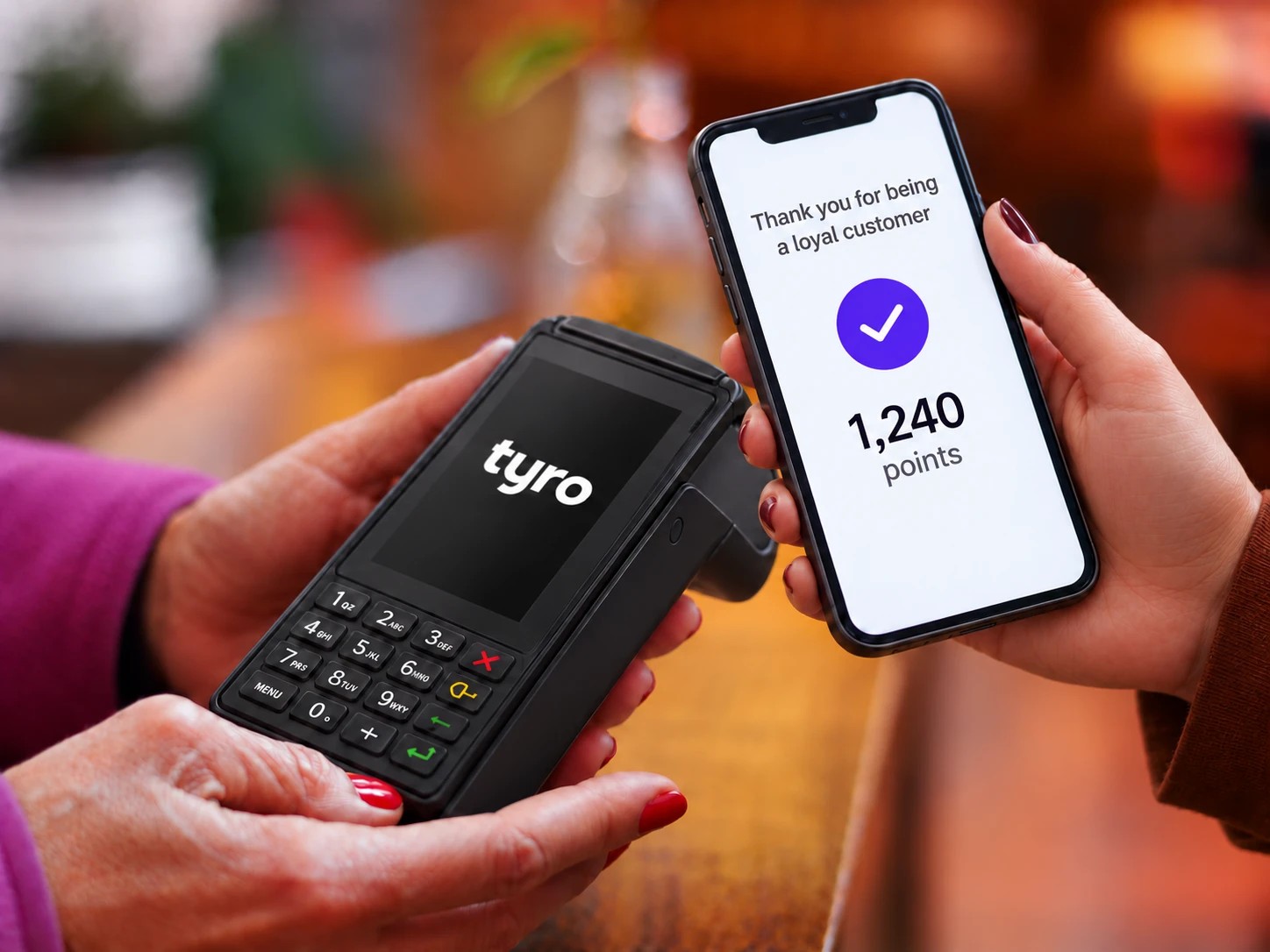
Customers earn 1 point per dollar wherever they shop, get a personal barcode by email and SMS, watch their balance in My Account, and redeem points as a discount at checkout - 40 points is a dollar off.

MY ACCOUNT · LOYALTY
You're 24 points from your next dollar off
1,216
pts
Worth A$30.40 at the counter.
Lifetime
3,480
Redeemed
$56
This month
+212
Hello, Jordan - member card
98300042
Order #10432
6 items
+58
Points earned in store
Birtinya counter
+85
In-store redemption
$10.00 off
−400
Order #10410
3 items
+31
Interactive · join at checkout

Sign up while you shop

A single tick on the checkout page - no separate form.

You're in. This order earns +72 pts, and your personal barcode arrives by email & SMS.
Interactive · checkout redemption

Apply loyalty credit

SubtotalA$72.40
Order totalA$72.40
Interactive · points calculator

What a regular shopper earns

Monthly spendA$200
200
pts / month
2,400
pts / year
A$60
in rewards

$1 SPENT = 1 POINT · 400 POINTS = $10 REWARD · POINTS NEVER EXPIRE

7.1

The rules (constants)

ConstantValueMeaning
AMOUNT_SPENT_TO_LOYALTY_POINTS1$1 spent = 1 point earned - floor(subtotal / 1)
LOYALTY_POINTS_PER_DOLLAR4040 points = $1 of redemption (400 = $10 off)
BARCODE_PREFIX983000Barcode = 983000 + Atria customer ID
ATRIA_ONLINE_CUSTOMER_GROUP_ID1Customer group used in Atria
ATRIA_LOYALTY_DEPOSIT_FLEX_KEY_ID70Deposit flex key for redemption (currently unused)
7.2

Two ways to join

Path A

Checkout consent checkbox

A “Sign up to our loyalty program” checkbox sits before the Place Order button - default-checked for guests & new users, hidden if already consented. Consent saves to order & user meta (and the WC session via an AJAX handler). On the first consenting order, points are earned, a barcode assigned, and the welcome email + SMS sent (de-duped by loyalty_welcome_sent across user, order & past orders).

Path B

From the loyalty page · /my-account/loyalty/

Customers can join any time from their account's Loyalty page - no separate form plugin. On signup, consent is set immediately, then a background job creates a WooCommerce account if needed (emails credentials), creates/updates the Atria customer with a barcode, sends the “🎉 Your Boococks Butchery Loyalty Barcode” email (Code 128 via barcodeapi.org), adds the contact to a TopSMS list and sends a welcome SMS.

7.3

The My Account “Loyalty” page - three states

A loyalty endpoint adds a “Loyalty” tab just before Logout. If a customer has no local barcode but exists in Atria (e.g. signed up in store), the page imports their barcode, consent & balance on the spot.

State 1

Not a member

Signup pitch, the built-in “Join” form, and the “how it works” footer ($1 = 1 pt, 400 = $10).

State 2

Barcode pending

“You’re all signed up!” - the barcode is being generated by the background job and appears shortly.

State 3

Member dashboard

Balance, “worth $X”, lifetime/redeemed/this-month stats, the member-card barcode, and the full ledger (All / Earned / Redeemed).

7.4

Redeeming at checkout

Shown only to logged-in users whose balance is worth ≥ $1. The “You have $X in loyalty credit (N pts) - apply it?” checkbox triggers a checkout refresh and applies a non-taxable negative fee: “Loyalty credit redeemed −$X”. Redemption is all-or-nothing up to min(balance worth, floor(total)). Order meta records loyalty_redeemed, loyalty_redeemed_points, loyalty_redeemed_dollars.

7.5

Earning

Online - floor(subtotal / 1), 1 point per whole dollar, only when consent = yes. In-store - pushed by Atria via the webhook. After checkout, net points (earned − redeemed) sync to Atria in one customer update, the user’s atria_loyalty_points meta is set, and two ledger rows are written - an earn row “Order #N” and, if applicable, a redeem row timestamped +1 second so it sorts after.

One barcode, everywhere

The same 983000… barcode at the counter and online.

98300042
Scanned in store
Points earned in store +85
My Account ledger
Points earned in store+85
Order #10432+58
Appears online instantly
Delivered by email & SMS via TopSMS
Pillar 04 · Admin control centre

Everything the store owner touches lives on one screen.

Switch between sandbox and production credentials, test the connection in a click, and run a full catalogue import with a live progress bar. Try the import below.

wp-admin/admin.php?page=atria-connector
Atria Connector - Settings
v1.0.3 · manage_options
https://api.atria…/api/
boococks-sandbox
Sync all products from Atria
Full re-import of every IsEcommerce item.
3.2

Settings fields

A top-level Atria Connector admin menu (two submenus - Settings & Logs - both require manage_options). The environment radio toggles which credential block shows.

FieldOption nameTypeNotes
Environmentatria_environmentradiosandbox / production · default sandbox
Sandbox API URLatria_sandbox_urltextBase URL, e.g. https://…/api/
Sandbox Client Idatria_sandbox_client_idtextSent as x-api-client
Sandbox Client Keyatria_sandbox_client_keypasswordSent as x-api-key
Production API URLatria_production_urltextProduction base URL
Production Client Idatria_production_client_idtext-
Production Client Keyatria_production_client_keypassword-
3.3

Test Connection

One button per environment. AJAX atria_test_connection performs GET {base}customers - success = HTTP 200. Each attempt is logged to atria_connection_logs (last 10) with timestamp, environment, status (attempting / success / error) and message, rendered in a Connection Logs table.

3.4

“Sync now” - full re-import

Destructive operation. AJAX atria_sync_products first deletes all WooCommerce products with an SKU (force delete), all categories (except Uncategorized), and all previously synced images (atria-sync-). It is a full reset, not an incremental sync.

A lock transient atria_sync_in_progress (2-hour expiry) prevents simultaneous runs. Items are fetched via GET items?$filter=IsEcommerce eq true and processed in batches of 100 with a 0.05s delay between items. Live progress is tracked in atria_sync_progress.

idlestartingfetchingprocessingcompletedcompleted_with_errorsfailed
3.5

The Logs page

A WP_List_Table over wp_atria_sync_logs - searchable, with status views and type / sync-type / date filters. Columns: Type, Reference Key, Sync Type, Status, Date Added, Sync Details (sortable; per-page saved as a screen option, default 10).

ValueMeans
Typeproduct · order · customer
Sync Typecreate · update · bulk_sync
Statussuccess · failed
Reference KeySKU (products) · order ID (orders) · email (customers)
Inbound webhook

Atria can push, too - one endpoint, three jobs.

When something changes in store, Atria POSTs to a single endpoint. The connector looks at which key is in the body and routes it - exactly one key per request. Pick a key to see the request and what happens.

POST /wp-json/atriasync/v1/sync Atria → your website
Request body Atria sends
{
  "PLUCode": "206",
  "EcommerceDescription": "‘KAIZEN’ MINCE…",
  "EcommerceRrpPrice": 10.99
}
What the connector does
201 Created
Product created
No product with SKU 206 existed, so the connector builds a new simple product - name, price, image and category - and returns its product_id.
Exactly one key per request - send none or two and the endpoint returns 400 “one data at a time”.
4.0

What each key does

Key in bodyTriggersBehaviour
PLUCodeProduct create / updateFound by SKU → updates name & prices only (200, or 403 if not valid for update). Not found → full create (201 with product_id, or 400).
CustomerOrderReferenceOrder fulfilmentRequires Status = "Filled". Already completed → 200 no-op. Else completes the order - capturing the authorised card via EUX WCPay Auth if active. Not found → 404.
EmailIn-store loyaltyAt least one of Earn/Redeem non-zero. Unregistered email → 200 skipped. Else balance += Earn − Redeem and one ledger row per activity.
Product updates touch only _regular_price (from EcommerceRrpPrice), _sale_price (from EcommerceUnitPrice), _price and the name. For variable products the connector walks the children to find the variation matching the SKU. Inventory updating exists but is commented out - stock stays unmanaged.
Plays well with

Integrations & dependencies.

WooCommerce Required

The storefront, orders, customers and checkout the connector reads and writes.

Atria API Required

The POS / ERP backend. Client-id/key headers and OData-style queries.

TopSMS Optional

Welcome SMS and the marketing list when a customer joins the program.

barcodeapi.org

Renders the Code 128 barcode images shown in emails and My Account.

EUX Pickup & Delivery Optional

Supplies the pickup/delivery slot, address and instructions on each order.

EUX Tyro Payments Optional

Take the payment via Tyro at checkout and capture it only when Atria marks the order “Filled”.

For developers

Technical reference.

The Atria Connector follows the WordPress Plugin Boilerplate pattern (loader, i18n, admin, public classes). The essentials, at a glance.

Authentication
  • x-api-client - client ID
  • x-api-key - client key
  • Content-Type: application/json
  • OData query syntax - $filter $orderby $top $select
Key endpoints
  • GET items?$filter=IsEcommerce eq true
  • GET customers?$filter=Email eq '…'
  • POST customers/{id}/orders
  • POST /wp-json/atriasync/v1/sync
Loyalty rules
  • 1 pt per $1 spent
  • 40 pts = $1 redemption
  • 400 pts = $10 reward
  • Barcode 983000 + customer ID
Database schema

Two tables, created on activation.

wp_atria_sync_logs
id · bigint PK reference_key · SKU / order ID / email type · product / order / customer sync_type · create / update / bulk_sync status · success / failed created_at · datetime · indexed details · human-readable summary
wp_atria_loyalty_logs
id · bigint PK customer_id · WP user · indexed order_id · nullable · indexed activity · “Order #123”, “…in store” points_earned / points_redeemed · int balance · int after event created_at · datetime
9

Complete reference of stored keys

WordPress optionPurpose
atria_environmentsandbox / production
atria_sandbox_* / atria_production_*URL, client id, client key per env
atria_connection_logsLast 10 connection tests
atria_sync_progressLive bulk-sync progress object
topsms_access_token / topsms_senderRead for TopSMS
User metaPurpose
customer_loyalty_consentyes / no
loyalty_welcome_sentyes / no
loyalty_barcodee.g. 98300042
atria_loyalty_pointsCurrent balance
Order metaPurpose
atria_syncedyes / no - pushed to Atria
customer_loyalty_consentConsent captured at checkout
loyalty_redeemed(_points/_dollars)Redemption details
_wpd_*Pickup / delivery slot & address
Product metaPurpose
_uomkg or ea
_unit_weight_in_kgUnit weight for order amounts
_country_of_origin / _ingredients / _storageText, surfaced by shortcodes
woodmart_price_unit_of_measureDisplay unit of measure (/kg, /ea)
9.5

Hooks registered

HookWhat it does
admin_menu / admin_initMenu, pages & settings
wp_ajax_atria_test_connectionTest the API
wp_ajax_atria_sync_productsBulk import
rest_api_initRegisters the atriasync/v1/sync webhook
woocommerce_thankyouPush order / customer / loyalty to Atria
woocommerce_checkout_update_order_metaSave loyalty consent & redemption at checkout
loyalty_signup (background job)Account creation, Atria sync, welcome email/SMS
woocommerce_review_order_before_submitLoyalty consent checkbox
woocommerce_review_order_before_paymentRedemption checkbox
woocommerce_cart_calculate_feesApplies the negative redemption fee
woocommerce_account_loyalty_endpointMy Account loyalty tab, endpoint & content
add_shortcode ×3country_of_origin · ingredients · storage
Operational notes. Uninstall is a stub - tables & options are not removed on uninstall, and deactivation does nothing. “Sync now” is a destructive full reset (see §3.4). Stock management is intentionally off; every product saves “in stock”. Welcome content, branding and the TopSMS list are hardcoded for Boococks.