
Two WooCommerce plugin vulnerabilities are being actively exploited in October 2026, and both leave something behind that a plugin update does not remove. One campaign plants a hidden administrator account on the store. The other uploads a PHP webshell into the uploads folder. This post explains what is being exploited, why updating is only the first step, and how to check your own store, with the exact queries and commands we use.
What is being exploited right now
WPC Product Bundles for WooCommerce (CVE-2026-93836)
WPC Product Bundles for WooCommerce has more than 30,000 active installs. Versions 8.6.6 and older have a stored cross-site scripting flaw in order data. The fix shipped in 8.6.7, and the plugin is now at 8.7.7. Version 8.7.3 fixed a second stored cross-site scripting issue, so update to the current version rather than the minimum.
Patchstack saw the first exploitation on 4 October 2026. The next day the same JavaScript payload, served from imgcdn1.com, was used against Ninja Forms (CVE-2026-94504, versions 3.15.3 and older, fixed in 3.15.4, more than 500,000 installs). The attack works like this:
- The attacker places JavaScript in a WooCommerce order field or a Ninja Forms submission. No login is needed for this step.
- The code sits in the database until an administrator opens that order or submission in wp-admin. It then runs with the administrator’s session and collects the nonces it needs.
- It installs a fake plugin called “WP Smart Thumbnails” 1.2.4 by “MediaPress Labs” and creates a new administrator account.
- Patchstack describes four ways back in: the visible administrator, a second administrator hidden from the Users screen by a must-use plugin, a secret login URL on wp-login.php that signs in as the site’s oldest administrator, and a file manager that needs no login at all.
- Deleting the fake plugin removes the first route only. The hidden account, the login URL and the file manager keep working.
WooCommerce Wholesale Lead Capture (CVE-2026-27540)
WooCommerce Wholesale Lead Capture is a premium plugin with around 6,000 installs. Versions 2.0.3.1 and older let anyone upload a file through the wholesale registration form’s AJAX handler, because the list of allowed file types is read from the request itself. An attacker adds PHP to that list and uploads a webshell, often named shell.php. The fix, version 2.0.3.2, was released on 20 February 2026.
Attacks did not stop at the patch. Wordfence reported in September that its firewall had blocked more than 100,000 exploitation attempts, with the peak between 4 and 17 June 2026 and further waves on 1 July and 30 August. The patch was months old during every one of those waves. The sites that were hit were the ones that had not updated.
| Plugin | CVE | Vulnerable | Fixed in | What it leaves behind |
|---|---|---|---|---|
| WPC Product Bundles for WooCommerce | CVE-2026-93836 | 8.6.6 and older | 8.6.7 (current 8.7.7) | Hidden admin, secret login URL, file manager |
| Ninja Forms | CVE-2026-94504 | 3.15.3 and older | 3.15.4 | Same payload as above |
| WooCommerce Wholesale Lead Capture | CVE-2026-27540 | 2.0.3.1 and older | 2.0.3.2 | PHP webshell in uploads |
Why updating the plugin is not enough
Updating closes the door. It does not remove whatever came through it. Patchstack’s advice is to treat any site where the script ran in an administrator’s browser as potentially compromised. Wordfence makes the same point from the other side: a clean log does not prove a clean site, because most hosts keep only a few weeks of access logs.
The persistence in the Product Bundles campaign is built to survive a normal clean-up:
- Must-use plugins in wp-content/mu-plugins load on every request, cannot be deactivated from wp-admin and do not appear on the Plugins screen.
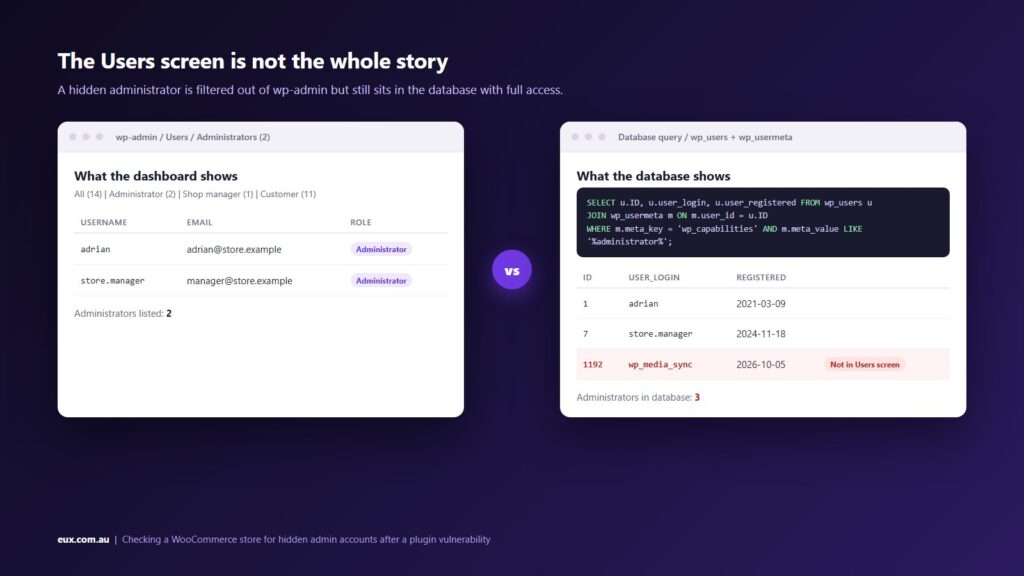
- The hidden-admin plugin filters the user query and adjusts the role counts above the user list, so the Users screen shows one administrator fewer than the database holds.
- The dropped files are obfuscated with a per-site key and their timestamps are set to match the oldest file in the WordPress root, so sorting by date does not surface them.
- The login token is stored in the options table. Deleting the option alone does not help, because the must-use plugin issues a new one.
Interactive: work through the checks
Use this step-through to record what you find on your own store. Each step tells you where to look and what a bad result looks like. The detailed commands follow below.
Store compromise check
Eight checks. Answer each one from what you actually find on the server, not from memory.
This tool runs in your browser only. Nothing you select is sent anywhere.
How to check your store, step by step
These checks assume SFTP access and a way to run queries against the database, such as phpMyAdmin, Adminer or WP-CLI. On Kinsta, both are in the MyKinsta dashboard. Replace wp_ with your own table prefix if it differs; you can read it from wp-config.php.
1. Confirm the plugin versions
Check the Plugins screen for the three plugins above, including inactive copies. An inactive vulnerable plugin can still be reachable in some cases, and it is a sign that updates are not being applied. With WP-CLI:
wp plugin list --fields=name,status,version,update_version2. Count administrators in the database, not on the Users screen
The hidden account is filtered out of the Users screen by the attacker’s code. The database is not filtered. Run this query and compare the number of rows with the Administrator count shown above the user list:
SELECT u.ID, u.user_login, u.user_email, u.user_registered
FROM wp_users u
JOIN wp_usermeta m ON m.user_id = u.ID
WHERE m.meta_key = 'wp_capabilities'
AND m.meta_value LIKE '%administrator%'
ORDER BY u.user_registered DESC;
With WP-CLI, the equivalent is:
wp user list --role=administrator --fields=ID,user_login,user_email,user_registeredPay attention to accounts registered in October 2026, and to any account you do not recognise regardless of date. Note that WP-CLI runs the same user query that the must-use plugin filters, so if the counts match but you still have doubts, trust the SQL.
3. Look for plugins you did not install
List wp-content/plugins over SFTP and compare the folders with the Plugins screen. The campaign uses the folder name wp-smart-thumbnails, but the name can change. Any folder you cannot account for is a finding. Patchstack notes that the fake plugin’s main file has a guard that stops it running during a normal page load, so it does nothing visible until it is called directly.
4. Read the mu-plugins folder by content
Open wp-content/mu-plugins. Many hosts place one or two files there (Kinsta has its own, for example). Open each file and read it. The dropped files in this campaign are named like class-wp-query-xxxxxxxx.php and class-wp-token-validate.php, and their contents are obfuscated. A readable file from your host or your developer is fine. An unreadable blob is not. Do not rely on the modified date, because it is backdated.
5. Search the uploads folder for PHP files
The Wholesale Lead Capture exploit drops its webshell into the uploads folder. Uploads should hold media only. Over SSH:
find wp-content/uploads -type f -name "*.php" -o -type f -name "*.phtml" -o -type f -name "*.php7"Without SSH, a security plugin’s file scan does the same job. Also look at the WordPress root for PHP files that are not part of core, and at wp-content itself.
6. Check the options table
The Product Bundles campaign stores a completion flag and its login tokens in wp_options:
SELECT option_id, option_name, LEFT(option_value, 80) AS value_start
FROM wp_options
WHERE option_name LIKE 'fz_emer_%';
Zero rows is the result you want. If rows exist, do not just delete them. The must-use plugin that created them will write new ones.
7. Search the access logs
Search your web server access logs, as far back as they go, for these strings:
- imgcdn1.com, /fz/x.js and /fz/c.php (the Product Bundles and Ninja Forms payload and its control server)
- _wplogin= on wp-login.php (the secret login URL)
- admin-ajax.php requests containing wwlc_file_upload_handler (the Wholesale Lead Capture upload)
- Direct GET or POST requests to any PHP file inside wp-content/plugins or wp-content/uploads
Patchstack lists five source IP addresses, four of them Tor exit nodes, so blocking addresses is not a defence. A log search that finds nothing only tells you about the period you still have logs for.
8. Run a scanner and check Search Console
Run a full scan with Wordfence or Sucuri from inside WordPress, run Sucuri SiteCheck from outside, and open Security Issues in Google Search Console. Scanners catch known webshells and modified core files. They do not reliably catch a hidden administrator, which is why steps 2, 4 and 6 are manual.
If you find something
Treat the store as compromised and work through this in order. It follows the WordPress.org guidance for hacked sites and Patchstack’s clean-up notes for this campaign.
- Write down what you found, where, and when you noticed it. You will need this later, and so will anyone who helps you.
- Take a full backup of the site as it is now, files and database, before you change anything. It is evidence, and it protects you if the clean-up breaks something.
- Update the vulnerable plugins so the door is closed while you work.
- Remove the rogue administrator accounts, the fake plugin, the dropped must-use plugins and the fz_emer_ options, in that order. Removing the options without the must-use files achieves nothing.
- Delete any PHP files found in uploads and any file you cannot account for in the WordPress root.
- Reset every password: all administrators, the database user, SFTP, SSH and the hosting control panel. The secret login URL signs in as your oldest administrator, so that account’s password must change even if it looks untouched.
- Replace the security keys and salts in wp-config.php with a new set from the WordPress.org generator. This logs out every session, including the attacker’s.
- Reinstall WordPress core by uploading fresh copies of wp-admin and wp-includes over SFTP, and reinstall plugins and the theme from fresh downloads. Installers from inside wp-admin overwrite existing files but do not remove added ones.
- Read .htaccess, index.php and the theme’s functions.php, header.php and footer.php. These are the usual places for a second payload.
- Re-run every check above. Then change the passwords again, because you may have changed them before the site was fully clean.
If you have a clean backup from before the first sign of trouble (before 4 October 2026 for the Product Bundles campaign), restoring it and then applying every update is often faster and more certain than cleaning in place. You will lose orders placed since the backup unless you export them first, so weigh that up.
Reducing the chance of the next one
- Apply plugin updates within days, not months. The Wholesale Lead Capture patch was more than three months old when exploitation peaked and more than six months old during the last wave.
- Turn on automatic updates for plugins that do not touch checkout or payments, and put the rest on a weekly schedule with a staging test first.
- Delete inactive plugins and themes. Every one of them is code that can be reached and that nobody is watching.
- Give staff the Shop Manager role rather than Administrator. The stored script in the Product Bundles campaign only gets administrator rights if an administrator opens the order.
- Require two-factor authentication for every administrator, and set DISALLOW_FILE_EDIT in wp-config.php so the theme and plugin editors are off.
- Block PHP execution inside wp-content/uploads at the web server level. Most managed hosts do this already; ask yours to confirm in writing.
- Keep a web application firewall in front of the site. Wordfence’s rule blocked more than 100,000 Wholesale Lead Capture attempts on sites that had not yet updated. A firewall is a buffer, not a patch.
- Repeat the administrator and mu-plugins checks monthly. They take five minutes and they are the two checks that scanners miss.
Plugin flaws are one of three ways in that we have written about this year. The other two are the PHP2Shell vulnerabilities in PHP itself, patched on 21 October, and card testing attacks on the checkout, which do not need a vulnerability at all. All three come down to the same routine: keep the stack current, limit who can do what, and check the things that automated tools do not.
FAQ
My store does not use any of these plugins. Do I need to do anything?
Run checks 2, 4 and 5 anyway. They take a few minutes and they catch the persistence left by most plugin exploits, not just these two. Then make sure every plugin you do run is on its current version, because the next campaign will target a different one.
Will updating the plugin remove a hidden administrator?
No. The update fixes the flaw that let the script in. The hidden account, the must-use plugins that hide it and the secret login URL are separate files and database rows that the update does not touch. They have to be found and removed by hand.
How do I find my table prefix?
Open wp-config.php and look for the table_prefix line. The default is wp_, but many installers set a random prefix. Replace wp_ in the queries above with that value, including in the wp_capabilities meta key, which also uses the prefix.
Can I just restore a backup?
Yes, if the backup is from before the compromise and you apply every update immediately after restoring. A backup taken after the script ran contains the hidden account and the must-use plugins, so restoring it puts the attacker back too. Export recent orders first if the backup predates them.
Does a firewall stop these attacks?
A firewall with current rules blocks the known exploit requests, which is how Wordfence stopped more than 100,000 attempts. It does not fix the plugin, and it does not help a site that was hit before the rule existed. Update the plugin and keep the firewall.
How we can help
We run WooCommerce stores for retailers across Australia, host them on Kinsta, and handle plugin updates and security checks for our hosting and maintenance clients. If you would like us to run the checks in this post on your store, our ecommerce audit covers plugin versions, user accounts, file integrity and server configuration alongside performance and conversion. If you have already found something, contact us and we will help you clean it up and close the gap. Ongoing updates and monitoring are part of our managed WordPress hosting.
Sources
- Patchstack: Four ways back in, the WordPress XSS campaign that hides its own admin account
- BleepingComputer: Ninja Forms plugin flaw exploited to hack WordPress sites
- Wordfence: Attackers actively exploiting critical vulnerability in WooCommerce Wholesale Lead Capture plugin
- Infosecurity Magazine: PHP webshell campaign targets WordPress through critical WooCommerce plugin
- WordPress.org: WPC Product Bundles for WooCommerce (changelog)
- WordPress.org: FAQ My site was hacked