

 WooCommerce Pro Partner
 WordPress Pro Partner



















Unfair Trading Practices Laws: What WooCommerce Stores Need to Change Before 1 July 2027
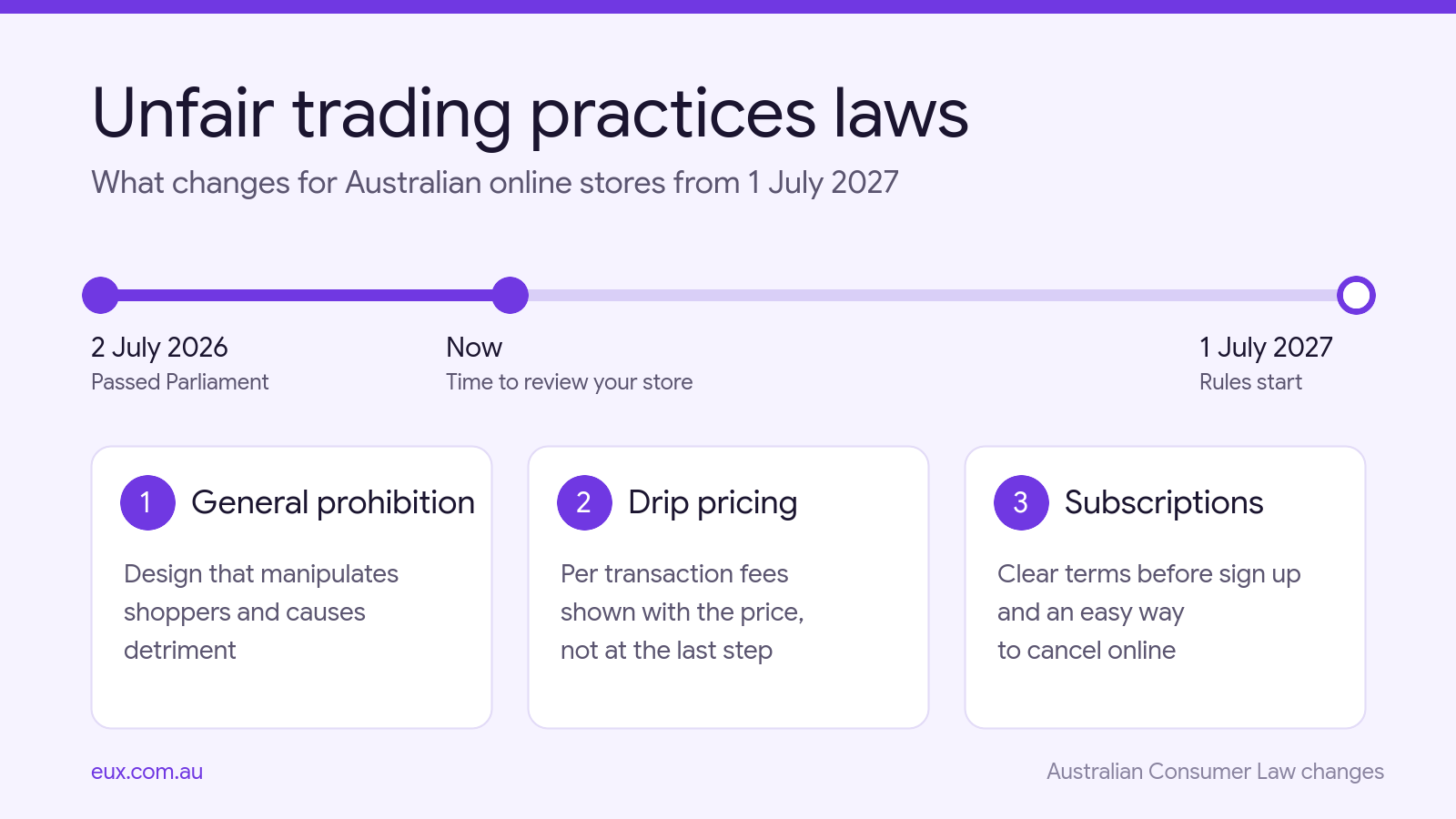
Australia’s new unfair trading practices laws start on 1 July 2027. They passed Parliament on 2 July 2026 and amend the Australian Consumer Law. The changes cover three things that affect most online stores: how the checkout is designed, how delivery and other fees are shown, and how subscriptions are sold and cancelled.
This guide explains what the law says, what it does not say, and what to check in a WooCommerce store before the start date. It is general information, not legal advice. Please speak to a lawyer about your own situation.
In this guide
What the unfair trading practices laws cover
The Competition and Consumer Amendment (Unfair Trading Practices) Act 2026 adds three sets of rules to the Australian Consumer Law:
- A general prohibition on unfair trading practices towards consumers.
- Drip pricing rules for fees that are charged per transaction, such as delivery or booking fees.
- Subscription rules covering what you disclose before sign up, the notices you send, and how a customer cancels.
The key facts, from the Treasury media release and the Parliamentary Library Bills Digest:
- Start date: 1 July 2027, after a 12 month transition period.
- Who it protects: consumers. The general prohibition and the drip pricing rules do not apply to business to business sales. The subscription rules also cover some small business subscribers.
- Who has to comply: any business selling to consumers, online or in store. There is no exemption for small stores.
- Regulator: the ACCC. The Government has funded it to publish guidance during the transition period.
- Penalties: for a company, the maximum for each contravention is the greater of $100 million, three times the benefit obtained, or 30 per cent of turnover during the breach period. The Bills Digest lists a maximum of $2.5 million for an individual under the general prohibition.
The general prohibition and checkout design
The general prohibition on unfair trading practices has two parts, and both must be met. The conduct must:
- manipulate the consumer, or unreasonably distort the environment in which they make a decision, and
- cause, or be likely to cause, detriment to the consumer. Detriment does not have to be financial. Wasted time and frustration can count.
The Act includes a list of examples that may be unfair trading practices. They include making it hard for a consumer to use their legal rights, leaving out material information, presenting information in an unclear or overwhelming way, and designing a digital interface that puts the consumer under unreasonable pressure.
The Explanatory Memorandum says the prohibition is aimed at “dark patterns” in digital interfaces. It also says it is not meant to catch legitimate or generally accepted marketing and sales practices. Allens gives false urgency countdowns, “confirm shaming” and hidden cancellation options as examples of dark patterns.
There is no fixed list of banned features, so each store needs to look at its own design. In a WooCommerce store, these are the items we would review first:
- Countdown timers that reset, or sales that never end.
- “Only 2 left” or “5 people are viewing this” messages that are not based on real stock or real visitors.
- Add-ons, warranties or donations that are ticked by default in the cart.
- Popups where the decline button uses guilt wording.
- Refund, return and cancellation information that is hard to find.
A real sale with a real end date is normal marketing. The risk is in messages that are not true, or designs that push a shopper into something they did not choose.
Drip pricing: delivery and handling fees
Drip pricing is when a shopper sees a base price first and only finds out about unavoidable fees late in the purchase. The new rule applies to “transaction based charges”. These are charges payable in connection with the sale, separate from the price of the product itself. Allens gives delivery and postage fees as examples.
When you show a base price, you must also show, for each transaction based charge:
- the amount, or how it is calculated if the amount cannot be worked out yet
- that it is charged per transaction
- whether it is, or may be, payable
- whether the base price includes it
According to Norton Rose Fulbright, this information must be legible, prominent and unambiguous, and shown at the same time as the price. Charges that the buyer chooses to add are excluded, and so are taxes and levies imposed on the supplier. Allens also lists payment surcharges as excluded. Payment surcharges have their own rules, which we covered in our post on the card surcharge ban.
What this means in WooCommerce
By default, WooCommerce shows shipping costs in the cart and checkout, not on the product page. Many stores also add handling, packaging or small order fees through plugins or custom code. These are the fees to review.
- Flat rate delivery: state the amount near the product price, for example “Delivery $12 per order”.
- Delivery by suburb, postcode or weight: state how it is calculated and link to the rates, for example “Delivery from $10 per order, based on your suburb”.
- Free delivery over a threshold: state the threshold and the fee below it.
- Handling, packaging and small order fees: either build them into the product price or show them next to it.
The rule applies to products ordinarily bought for personal or household use. Wording and placement are worth checking once the ACCC guidance is published.
Subscription rules for WooCommerce stores
The subscription rules apply to contracts that run for an indefinite period, fixed periods that renew automatically, free trials that continue into a paid plan, and discount periods that roll into a higher price. Meal boxes, coffee and pet food subscriptions, memberships and “subscribe and save” offers are typical examples.
There are three duties:
- Before sign up: disclose that it is a subscription, what the customer will pay, the contract period, how it renews, any notice needed to end it, and how to end it.
- During the subscription: send notices with key information at set points, for example before a free trial ends or before a renewal. The content and timing will be set by regulations.
- Cancelling: the way to cancel must be easy to find and straightforward, with only the steps that are reasonably necessary. If the customer signed up online, or you offer online sign up, they must be able to cancel online.
The rules apply to subscriptions entered into after 1 July 2027. According to HWL Ebsworth, they also apply to older subscriptions that are renewed, extended or varied after that date, so existing subscribers are covered once they renew.
What this means in WooCommerce Subscriptions
- Cancel button: the WooCommerce Subscriptions documentation says active subscriptions show a Cancel button in My Account by default, and it can only be removed with custom code. Check that your theme, a snippet or an add-on has not removed or restricted it.
- Payment gateway: the button only shows when the gateway supports cancellation. Test it with each gateway you use.
- Minimum terms: if you use an add-on that blocks cancellation for a period, the minimum term needs to be clear before sign up.
- Product page and checkout: show the price, billing period, renewal terms and how to cancel before the customer pays.
- Emails: plan for trial ending and renewal reminder emails. Wait for the regulations before you lock in the wording and timing.
Guest checkout and dynamic pricing
Some articles say the unfair trading practices laws require a guest checkout option and ban dynamic pricing. The Act does not say either of those things.
Both ideas come from the “Click to Cancel” campaign that ran alongside the bill. The Bills Digest states that the bill does not expressly prohibit requiring an account for a one-off purchase, and has no specific rule on dynamic or personalised pricing.
The Digest also notes that forced account creation could potentially be caught by the general prohibition, for example where it adds unnecessary friction at checkout or collects data that the sale does not need. So guest checkout is not a stated requirement, but it lowers the risk.
In WooCommerce, the guest checkout option is under WooCommerce, Settings, Accounts and Privacy. If you need accounts for a real reason, such as subscriptions or trade pricing, keep the sign up fields to what the order needs.
Store checker
Answer the questions below to see which parts of the unfair trading practices laws are relevant to your store. It runs in your browser and nothing is saved.
Your results
Answer the questions to see what to review.
This checker is a general guide based on the published summaries of the Act. It is not legal advice.
What to do in WooCommerce before 1 July 2027
These are the steps we suggest to get a WooCommerce store ready for the unfair trading practices changes:
- List every fee. Place a test order and note each charge that appears after the product page: delivery, handling, packaging, small order fees.
- Show fees with the price. Add the amount or the calculation method near the product price, or build the fee into the price.
- Review urgency and scarcity messages. Keep the ones based on real data. Remove the rest.
- Check pre-selected options. Make add-ons opt in.
- Test the subscription journey. Sign up as a customer, then cancel from My Account. Count the steps and note anything that is hard to find.
- Update subscription product pages. State the price, period, renewal and cancellation terms before checkout.
- Decide on guest checkout. Turn it on unless you have a clear reason to require accounts.
- Watch for ACCC guidance and the regulations. The notice requirements for subscriptions are not final yet.
Most of these checks fit into a regular store review. Our ecommerce website maintenance checklist covers the routine checks to run alongside them.
Frequently asked questions
When do the unfair trading practices laws start?
They start on 1 July 2027. The bill passed Parliament on 2 July 2026, and the Government allowed a 12 month transition period for businesses to prepare.
Do the unfair trading practices laws apply to small online stores?
Yes. They apply to any business that sells to consumers, whatever its size. The general prohibition and the drip pricing rules do not apply to business to business sales.
Do I have to show delivery fees on the product page?
From 1 July 2027, a fee charged per transaction must be shown with the base price. If the amount depends on the address or the order, you show how it is calculated. The safest approach is to state delivery costs near the product price and not leave them for the checkout.
Is guest checkout required under the unfair trading practices laws?
No. The Act does not expressly require guest checkout. The Parliamentary Library notes that forced account creation could potentially be caught by the general prohibition in some cases, so offering guest checkout reduces the risk.
Do the subscription rules apply to existing subscribers?
They apply to subscriptions entered into after 1 July 2027, and to earlier subscriptions that are renewed, extended or varied after that date. In practice, most active subscribers will be covered once their next renewal goes through.
How we can help
EUX is a WooCommerce Pro Partner based in Sydney. We build and maintain WooCommerce stores, including checkout, delivery fee and subscription setups. We can review your store against the unfair trading practices changes and make the updates:
- An ecommerce audit that covers checkout design, fee display and the subscription journey.
- WooCommerce development to show delivery fees on product pages, fix cancellation flows and set up reminder emails.
We are not lawyers, so we work alongside your legal adviser on the wording. Please contact us if you would like us to take a look at your store.
Sources
- Treasury Ministers: Unfair trading tricks and traps to be banned (2 July 2026)
- Parliamentary Library: Bills Digest No. 58, 2025-26 (5 May 2026, written on the bill as introduced)
- ACCC: Competition and consumer law responding to economic change (speech, 3 September 2026)
- Allens: Australia’s new unfair trading practices regime (13 July 2026)
- Norton Rose Fulbright: New unfair trading practices laws to commence 1 July 2027
- HWL Ebsworth: Parliament passes unfair trading practices reforms (10 July 2026)