

 WooCommerce Pro Partner
 WordPress Pro Partner


















WooCommerce 11.3: What Changes and What to Test Before You Update
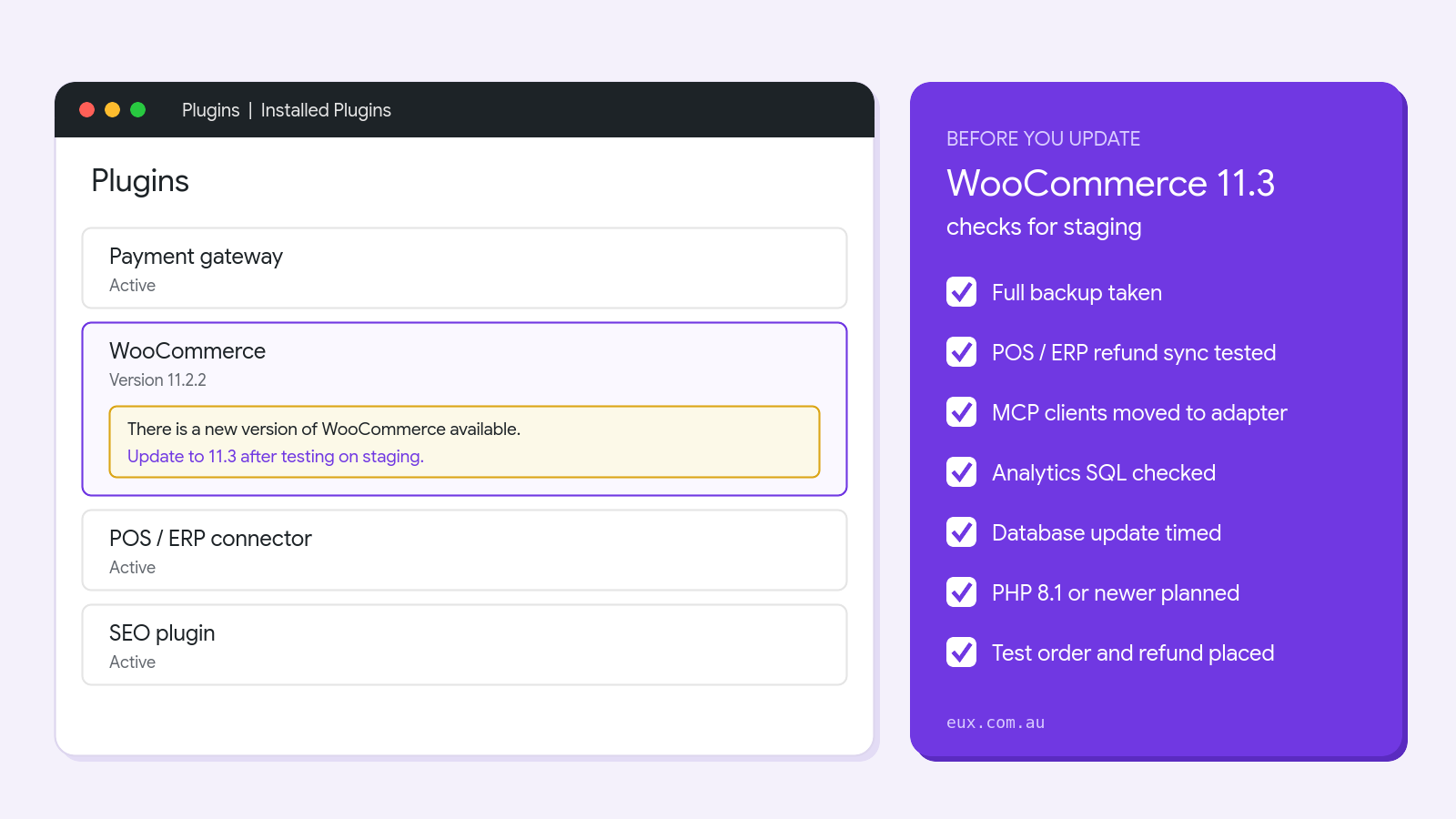
WooCommerce 11.3 is scheduled for release in the week of 9 November 2026. It is a feature release, not a security patch, but it changes how refunds are checked through the REST API, removes the old WooCommerce MCP endpoint, adds a new column and index to Analytics, and starts warning stores still on PHP 7.4 or 8.0. This guide explains what changes for store owners, what changes for POS, ERP and other integrations, and the checks we run on staging before a WooCommerce 11.3 update goes live.
In this guide
When WooCommerce 11.3 is released
The WooCommerce developer blog lists 11.3 as “scheduled for the week of November 9, 2026”. At the time of writing, 11.3.0-beta.2 is the latest test build on GitHub and the final release has not been published yet.
Two other dates matter:
- 11.2.2 is the current secure version. It was released on 4 November with security fixes. If you have not applied it yet, do that first. Our WooCommerce 11.2.2 guide covers the steps.
- 11.3.1 will follow 11.3.0. WooCommerce has said that 11.3.1 will carry the next batch of security fixes under its new patch release process. Plan to apply it soon after it ships.
WooCommerce 11.3 changes store owners will notice
Most of the visible changes are small improvements. None of them need action on an existing store, but they are worth knowing about.
- Payment method in Analytics. The Orders report gets a payment method column, a filter and a CSV export column. This is useful when you need to reconcile card, PayPal and bank transfer orders separately.
- Refund and returns policy page. You can choose this page under Settings, Advanced, Page setup. WooCommerce marks it in the Pages list and adds structured data that links to it.
- On-Sale Badge options. The block can show text, the amount saved or the percentage saved, with a prefix and suffix. Variable products show “Up to” the largest discount. The default stays “Sale”, so existing badges do not change.
- Block styling. The Product, Featured Product, Featured Category and Product Categories List blocks get colour, spacing and border controls. The product gallery uses native swiping on mobile.
- Legacy Reports menu. Stores first installed on 11.3 or later will not show WooCommerce, Reports. Existing stores keep the menu, and the page still works at admin.php?page=wc-reports.
Changes that affect integrations and custom code
This is the part of WooCommerce 11.3 that needs testing. Most of our work is connecting WooCommerce to POS, ERP and accounting systems through the REST API, and these are the changes we are checking on client staging sites.
Stricter refund validation in the REST API
Refunds created through POST /wp-json/wc/v3/orders/{order_id}/refunds are now rejected when the line item amounts do not match the top level amount, or when they add up to more than the amount still refundable. The API returns an HTTP 400 or 422 error instead of creating the refund.
This is a good change, because it stops over-refunds. The risk is a connector that ignores the error and assumes the refund went through. If your POS or ERP pushes refunds into WooCommerce, test a full refund, a partial refund and a refund on an order that already has one, and confirm the connector logs any rejection.
Product queries that combine on_sale with include
In the v2 and v3 products API and the Store API, a request with on_sale=true and an include list now returns only products that are both in the list and on sale. If a feed, app or custom block relies on the old result, it will return fewer products.
VAT exemption and calculated shipping now persist
The customer’s VAT exempt flag and calculated shipping are now saved with the account. Custom code that only ever sets VAT exemption to true needs to set it both ways, based on the customer’s current details. Otherwise an exemption can carry over to an order where it should not apply. This matters for B2B and trade stores with tax exempt customers.
Other developer changes
- Custom Analytics SQL that joins the orders table and uses a bare
payment_methodcolumn will fail with an “ambiguous column” error. Add the table name or alias. - The customer search filter on the order edit screen now keys the selected customer by user ID instead of 0.
- Product Collection blocks with filters now use the Product Filters engine, so code that edits the generated meta or tax queries should change the query arguments instead.
- With a block theme, the Shop page template value reads as archive-product even if another template is saved.
- Some protected methods in the Single Product block code are removed. Custom subclasses that use them will break.
Our WooCommerce ERP integration guide explains how these connections are usually built, if you are not sure what your store uses.
MCP and AI assistant connections
MCP (Model Context Protocol) is how AI assistants such as Claude connect to a store to read products or orders. WooCommerce 11.3 removes its own MCP endpoint at /wp-json/woocommerce/mcp. Requests to it return HTTP 410. WooCommerce REST API keys can no longer be used for MCP, and WooCommerce stops bundling the MCP Adapter and Abilities API packages.
If you connected an AI assistant to your store, WooCommerce asks you to do this before testing or installing 11.3:
- Install and activate the MCP Adapter plugin from WordPress.org.
- Create a WordPress application password for a user with only the access the assistant needs.
- Point the MCP client at
/wp-json/mcp/mcp-adapter-default-serverwith that username and application password. - Revoke the REST API keys you created for the old endpoint.
We use MCP connections ourselves to manage WordPress sites. The most important step is the user behind the application password: give it only the capabilities the assistant needs, because the assistant can do anything that user can do.
Hosting checks: the database change and PHP
The new Analytics column on large stores
To support the payment method report, WooCommerce 11.3 adds a column and an index to the Analytics data, then backfills it in the background in batches of 500 orders. WooCommerce says the index needs about 47 MB per 1 million orders, and on older database servers such as MySQL 5.7, adding the column rebuilds the whole table.
For a small store this takes seconds. For a store with hundreds of thousands of orders on an older database server, schedule the update for a quiet period, check you have the disk space, and watch Tools, Scheduled Actions until the backfill jobs finish.
PHP 7.4 and 8.0 warning
WooCommerce 11.3 shows an admin notice on stores running PHP 7.4 or 8.0. WooCommerce has said 11.5 is the last release that supports them, and 11.6 will need PHP 8.1 or newer. It recommends planning a move to PHP 8.3 or newer. You can check your version under Tools, Site Health, Info, Server. A PHP upgrade can break old plugins, so test it on staging like any other update. If your host cannot offer a current PHP version, our managed WordPress hosting runs current PHP versions on Kinsta.
WooCommerce 11.3 impact checker
Tick what applies to your store. The checker lists the tests to run on staging before you update.
Impact checker
What does WooCommerce 11.3 change for your store?
0checks for your staging test
Tick the items above that apply. Every store should still take a backup, update on staging first and place a test order with each payment method.
How to test and apply the WooCommerce 11.3 update
This is the order we follow for client stores:
- Confirm you are on 11.2.2. Apply the security release first so you are not waiting on 11.3 for fixes.
- Move MCP clients to the MCP Adapter if you use one, before anything else.
- Copy live to staging with a recent database, so the Analytics change runs against a realistic order count.
- Update WooCommerce on staging, run the database update, and time how long the backfill takes.
- Test the money paths. Place a test order with each payment method, refund it in full and in part, and check the refunds reach your POS or ERP. Check any refunds that start in the POS or ERP reach WooCommerce.
- Check custom code and reports from the checker above, and the PHP error log.
- Back up live and update in a quiet period, then repeat a short test order.
- Apply 11.3.1 when it is released, since it will carry security fixes. After any security update, check the installed version even if auto-updates are on.
If you would rather test early, WooCommerce publishes beta and release candidate builds through the WooCommerce Beta Tester plugin. Only use it on staging.
FAQ
When is WooCommerce 11.3 released?
WooCommerce has scheduled 11.3 for the week of 9 November 2026. Check the WordPress plugins screen or the WooCommerce developer blog for the final release.
Will WooCommerce 11.3 remove the Reports menu from my store?
No. Only stores first installed on 11.3 or later lose the legacy Reports menu item. Existing stores see no change, and the reports page still works by URL.
Do I need to change anything if I use an AI assistant with WooCommerce?
Yes, if it connects through the WooCommerce MCP endpoint with a REST API key. Install the MCP Adapter plugin, create an application password and point the assistant at the adapter endpoint before you update.
Should I update to WooCommerce 11.3 straight away?
Stay on 11.2.2 until you have tested 11.3 on staging, especially if you have integrations or a large order history. Then update, and apply 11.3.1 promptly when it ships because it will include security fixes.
How we can help
EUX is one of three WooCommerce Pro Partners in Australia. We look after hosting, updates and custom POS and ERP integrations for WooCommerce stores, and we test feature releases like WooCommerce 11.3 on staging before they reach a live checkout.
- If you would like us to test and apply the update for you, please contact us.
- If a connector or custom code needs changes for the new refund or VAT behaviour, see our WooCommerce integrations services.
- For a wider review of plugins, PHP version and performance, see our ecommerce audit.
Sources
- WooCommerce 11.3: What’s coming for developers (WooCommerce Developer Blog)
- WooCommerce 11.3 MCP Adaptor updates (WooCommerce Developer Blog)
- What Woo has done about security since June (WooCommerce Developer Blog)
- WooCommerce 11.2.2: Release notes (WooCommerce Developer Blog)
- WooCommerce releases (GitHub)